
Getting started with Bedrock AgentCore Runtime

At the AWS Summit in New York this year, Amazon announced a new set of services for building, deploying, and operating your AI agents under the umbrella of Amazon Bedrock AgentCore. In preview are the following:
AgentCore Runtime — provides serverless compute for agents
AgentCore Gateway — exposes a unified interface for tool access
AgentCore Identity — secures access from agents to AWS and 3p services
AgentCore Memory — stores and manages agent context across sessions
AgentCore Observability — provides visibility into agent behavior
AgentCore Browser — provides a managed browser tool
AgentCore Code Interpreter — provides isolated compute for untrusted code
Over the coming weeks, I plan to dive deep on and provide my personal getting started guide for each of the services. Of course, there are already samples with plenty of tutorials and a starter toolkit on GitHub to get started. These are great resources, which I encourage you to digest.
However, I wrote in the past about application development using enterprise-grade blueprints, because that’s how I see organizations who build and deploy with governed local developer experience and ruggedized software delivery processes. I imagine platform engineers and those who focus on developer experience need to understand the next layer of detail that is often not covered by basic tutorials or is obfuscated by starter toolkits. So these guides aim to provide a “doing it the hard way” perspective when using the AgentCore services and to share some of the challenges overcome along the way.
Introduction to AgentCore Runtime
AgentCore Runtime is a good place to start, as this is the serverless compute service where you can host both your agents and your MCP servers. Most of what I describe in this post refers to both agents and MCP servers, but for simplicity, I just refer to agents for most of this post.
Let’s take a high-level look at the relevant components and flow for you to deploy and run your agent on AgentCore Runtime.
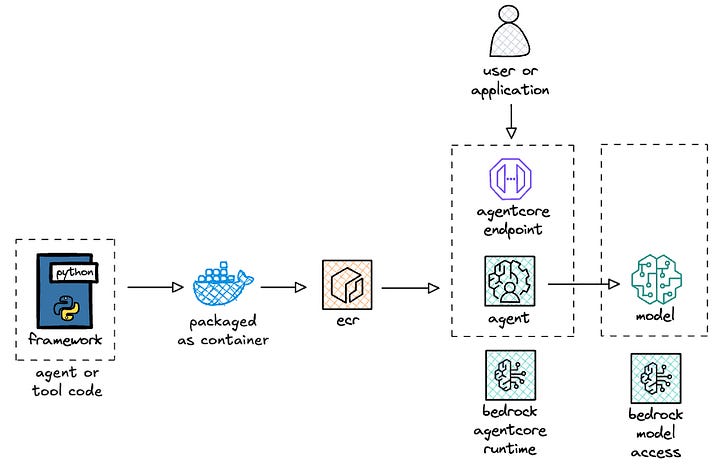
AgentCore Runtime allows you to bring the framework that you prefer or that your organization has approved for usage, e.g. Strands Agents, LangGraph, CrewAI, etc. I aim to eventually get examples of all these frameworks in a repository but for this post, I built a sample deployment of Strands on AgentCore Runtime.
The code that you write for your agent is packaged as an arm64 container and pushed to Amazon Elastic Container Registry (ECR). AgentCore Runtime then hosts your agent container image and exposes an invoke endpoint for your users or applications to access the functionality of your agent. The agent could either access a locally hosted model inside the container or more likely access a model via an external endpoint like with Amazon Bedrock.
Ok, let’s dive deeper and see how this all works in action!
Building and testing a hello world agent for AgentCore
I previously wrote about Strands and deploying that on Lambda for serverless compute and API Gateway as the frontend. In that stack, I used Lambda Web Adapter (LWA) to proxy the event payload from Lambda to the underlying agent endpoint as an HTTP request.
To get started with AgentCore Runtime, you write your agent code as you normally would with your framework of choice. Then 1/ import the AgentCore module, 2/ instantiate it, and 3/ annotate your agent invocation method. Below is a simplified version of a hello world agent.
from bedrock_agentcore import BedrockAgentCoreApp
from strands import Agent

app = BedrockAgentCoreApp()
agent = Agent()

@app.entrypoint
async def agent_invocation(payload, context):
    prompt = payload.get(”prompt”)
    result = agent.stream_async(prompt)
    async for chunk in result:
        if ‘data’ in chunk:
            yield (chunk[’data’])

if __name__ == “__main__”:
    app.run()
For the Lambda folks, this is similar to the function handler, where agent_invocation() is the handler function, payload is the event payload, and context is additional runtime information. For AgentCore Runtime invocations, the payload schema just includes the prompt: {"prompt": "What is VO2 max? What is the best way to improve it?"} and the context object just includes the session id for observability: {"session_id": "67e1e341-c716–453a-a7e6-fad8f785e761"}.
This annotation approach allows you to run your agent locally, wherein it just runs as a local endpoint:
uv run agent/app.py
2025-08-12 13:58:09,647 (botocore.credentials) [INFO] Found credentials in shared credentials file: ~/.aws/credentials
INFO:     Started server process [18202]
INFO:     Waiting for application startup.
INFO:     Application startup complete.
INFO:     Uvicorn running on http://127.0.0.1:8080 (Press CTRL+C to quit)
Then you can just invoke the endpoint with the appropriate headers and payload to get a streaming response:
curl -X POST http://localhost:8080/invocations -H “Content-Type: application/json” -d ‘{”prompt”: “What is VO2 max? What is the best way to improve it?”}’
data: “**”
data: “What is VO2 Max?”
data: “**\n\nVO2 max (”
data: “maximal oxygen uptake) is the”
data: “ maximum amount of oxygen your body can utilize”
data: “ during intense exercise. It’s measured in”
(...)
You could also containerize the application, run the container locally, and do the same local testing.
This great for the local developer experience, as the only thing that changes here is 1/ the import of an additional dependency, 2/ the instantiation of that dependency, and 3/ the annotation of the agent entry point. Nominal change in exchange for the advantage of running my agent on serverless compute.
Furthermore, if at any point in the future, you wanted to move out of AgentCore Runtime into your own agent compute platform, you could just remove the dependency and annotation, containerize the updated agent, and deploy to the new platform. This makes it a relatively light lift in scenarios where application portability is a business requirement.
Next, let’s deploy the agent to AgentCore Runtime!
Deploying to AgentCore Runtime
There are currently two options for deploying to AgentCore Runtime today. The first and easiest is using the starter toolkit (documentation, code). This allows you to get up and running fairly quickly to prototype your agents.
The second is using the AWS SDK for Python (boto3) by instantiating a client for the AgentCore (documentation). I built my own wrapper around the SDK for create, update, and invoke actions with a number of configuration options. I use click to make the script a parameterized CLI tool and use make to build repeatable commands.
Some comments and observations from building this deployment wrapper:
1/ Deployment via infrastructure-as-code would, of course, be preferred. Remember that AgentCore is currently in public preview, and support for CloudFormation is a high priority. Once enabled, you can leverage git-based deployment and standard change management practices for deploying your agents into production.
2/ Two separate clients are required: control plane for management actions, data plane for agent invocations. The control plane actions to create or update agents take a common set of input parameters:
agentRuntimeArtifact: the URI of the ECR repositoryroleArn: the ARN of the IAM role for the agentnetworkConfiguration: the network mode, where onlyPUBLICis currently allowedprotocolConfiguration: HTTP for agents, MCP for MCP serversenvironmentVariables: optional environment variables for your agentauthorizerConfiguration: for setting up auth
3/ The control plane actions for creating and updating agents are two separate functions, rather than a singular upsert type function. As a result, I wrote some code to catch the exception for when an agent with a specified name already exists. If an agent with the specified name already exists, the code instead provides details of the deployed agent. This is useful, as you need the agentRuntimeId for updating the agent and the agentRuntimeArn for invoking the agent.
Below is a response payload when getting deployment details of an agent:
{
  “agentRuntimeArn”: “arn:aws:bedrock-agentcore:us-east-1:123456789012:runtime/strands_hello-Op6nuyBa63”,
  “agentRuntimeId”: “strands_hello-Op6nuyBa63”,
  “agentRuntimeVersion”: “4”,
  “agentRuntimeName”: “strands_hello”,
  “lastUpdatedAt”: “2025-08-12T17:52:13.236094+00:00”,
  “status”: “READY”
}
4/ Lastly, I mentioned it above but I reiterate it here. The container needs to be built for arm64 architecture. Otherwise, you get the following error:
botocore.errorfactory.ValidationException: An error occurred (ValidationException) when calling the CreateAgentRuntime operation: Architecture incompatible for uri ‘123456789012.dkr.ecr.us-east-1.amazonaws.com/agentcore/hello:1’. Supported architectures: [arm64]Ok, let’s take a look at data plane actions next!
Invoking agents on AgentCore Runtime
I already covered local testing above. For invoking the agent that is deployed to AgentCore Runtime, there are two required parameters: agentRuntimeArn and payload. The former is the Amazon Resource Name that uniquely identifies the agent on AgentCore Runtime, and the latter is just the prompt, as described in the section above via the payload schema.
There are also quite a number of parameters around observability, and then a qualifier parameter wherein you can specify an endpoint. For the folks familiar with Lambda, the endpoint is akin to a function alias, which then points to a particular agent version. With this qualifier parameter, documentation states that it can be a version number or an endpoint name. I tried pointing directly to a version number and got the following error, which I chalk up to public preview behavior:
botocore.errorfactory.ResourceNotFoundException: An error occurred (ResourceNotFoundException) when calling the InvokeAgentRuntime operation: No endpoint or agent found with qualifier ‘2’ for agent ‘arn:aws:bedrock-agentcore:us-east-1:123456789012:runtime/strands_hello-Op6nuyBa63’Regardless, the endpoint is the preferred configuration mechanism, as you could setup a dev, uat, and prod endpoint, and then use your pipelines to individually update endpoints to the appropriate versions. That said, as far as I know, endpoints don’t yet support blue/green, canary, or rolling deployments for versions.
I used the client provided by the tutorial as the baseline code to invoke my agent that was now deployed in AgentCore Runtime. When configuring the agent with no authorizer required, everything worked fine. However, when configuring an MCP server with an authorizer required, I kept getting 403 permission denied errors.
Before I get to the resolution, let’s walk through IAM policies for agents first, so you better understand what’s happening.
Configuring IAM policies for agents
When deploying an agent to AgentCore Runtime, you (or likely your security team) need to vend an IAM role that your agent assumes. The tutorial provides an example IAM role, which I then converted into a CloudFormation template.
Below is a view of the end to end stack with everything covered so far.
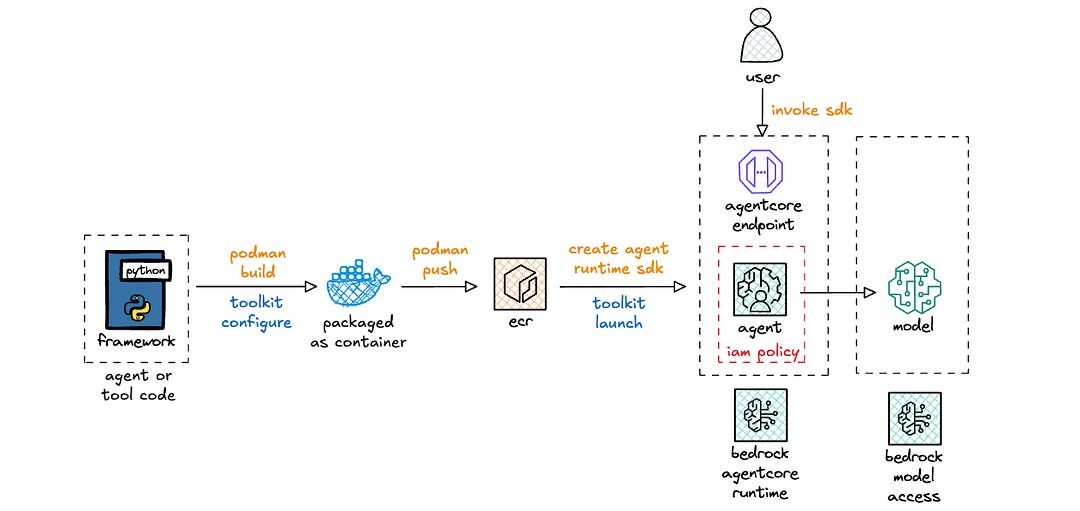
IAM polices for AgentCore Runtime use a new service principal: bedrock-agentcore.amazonaws.com, which is distinct from the broader Amazon Bedrock service principal: bedrock.amazonaws.com. For organizations that must first allow-list services before development teams can use a service, this new principal needs to be onboarded, which can be expedited using service onboarding accelerator documents that AWS can provide.
There are a bunch of policies, which I’ve grouped into buckets: CloudWatch, ECR, X-Ray, and Bedrock. I want take a quick aside on the Bedrock policy, as I hit a snag with my permissions, that took a bit to finally resolve (shout out to a colleague, Gopinath Jagadesan, for identifying the root cause).
When I kept getting 403 forbidden errors for my MCP server, I updated the client slightly, particularly on the exception handling side in an attempt to better understand why my agent invocation might be failing.
uv run mcp/client.py
Invoking: https://bedrock-agentcore.us-east-1.amazonaws.com/runtimes/[ENCODED_ARN]/invocations?qualifier=DEFAULT
with headers: {’authorization’: ‘Bearer eyJraWQiOi...’, ‘content-type’: ‘application/json’}

❌ HTTP Error: 403 Forbidden
   URL: https://bedrock-agentcore.us-east-1.amazonaws.com/runtimes/[ENCODED_ARN]/invocations?qualifier=DEFAULT
   Response: [streaming response content not available]
I explored a few possible problems.
The first step was to make sure that the endpoint was correct. I suspected it was fine, since I started with provided boilerplate code. Regardless, I printed out the URL just in case. The [ENCODED_ARN] portion of the URL is the agentRuntimeArn value, which includes : and possibly / characters. Those, of course, would mess up the URL — so : is encoded as %3A and / is encoded as %2F.
The next step was to ensure that the access token that I included was indeed valid. I refreshed the access token to ensure that it wasn’t expired. I inspected it using jwt.io to check the scope — one with the default aws.cognito.signin.user.admin scope and another with a custom mcp.heeki.cloud/agentcore:mcp_echo scope. The scope didn’t matter. I aim to come back to this when I cover AgentCore Identity.
With those validations, I needed to look deeper into logs, but CloudWatch logs weren’t yet generated, since the 403 permissions error blocks invocation of the agent. My colleague looked in CloudTrail and asked me to see if there were any access denied errors with the following action: GetWorkloadAccessTokenForJWT. Eureka!
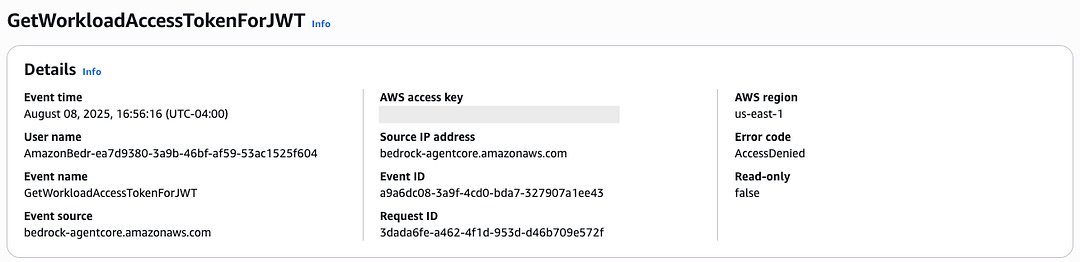
When I looked at the IAM policy that I transposed from the tutorial code, I saw that I incorrectly transposed the resource name. The incorrect policy is below, in case you want to see if you can identify it first.
- PolicyName: bedrock
  PolicyDocument:
    Version: ‘2012-10-17’
    Statement:
      - Effect: Allow
        Action:
          - bedrock-agentcore:GetWorkloadAccessToken
          - bedrock-agentcore:GetWorkloadAccessTokenForJWT
          - bedrock-agentcore:GetWorkloadAccessTokenForUserId
        Resource:
          - !Sub ‘arn:aws:bedrock-agentcore:${AWS::Region}:${AWS::AccountId}:workload-identity-directory/default’
          - !Sub ‘arn:aws:bedrock-agentcore:${AWS::Region}:${AWS::AccountId}:workload-identity-directory/default/workload-identity/agentName-*’
I incorrectly copy/pasted the agentName-* and should have updated the agentName portion to be my specific agent. For example, the ARN for this particular workload is:
arn:aws:bedrock-agentcore:us-east-1:123456789012:workload-identity-directory/default/workload-identity/mcp_echo-N0geaLEEPE”Upon inspection, it’s obvious that mcp_echo-N0geaLEEPE doesn’t match the agentName-* resource in the policy. Thus, that action failed and caused the 403 errors. In this scenario, I wonder if a 500 error with a message indicating access denied errors would have been more helpful. The 403 error had me thinking it was something on the client request, when in fact, it was the backend IAM role that blocked the ability of the agent to properly process the incoming bearer token.
Regardless, after I updated my IAM policy, I was able to successfully connect to that MCP server, both via the client and via MCP Inspector.
Conclusion
Bedrock AgentCore runtime is a serverless compute option for running your agents and MCP servers on AWS. It allows you to bring your existing agents and MCP servers to the runtime with minimal changes, which makes it easy to bring them to AgentCore Runtime and enables application portability out should the business require the flexibility.
The service is still in public preview, so the deployment and runtime experiences are certainly subject to change and likely to improve. I covered some of the sharp edges that I encountered and hope that this article helped you as you explore the potentials of AgentCore Runtime.
Stay tuned for upcoming posts that will cover other services in the Bedrock AgentCore portfolio.
Resources
https://docs.aws.amazon.com/bedrock-agentcore/latest/devguide/getting-started-custom.html
https://boto3.amazonaws.com/v1/documentation/api/latest/reference/services/bedrock-agentcore.html
https://github.com/heeki/agents/tree/main/strands-on-agentcore
Note
This article was originally published on Medium.