
Managing credentials and secrets in agentic applications with AgentCore Identity

I continue to have lots of discussions with customers on how to manage credentials and secrets in agentic applications. In a prior blog post, I wrote about OAuth2, covering roles, flows, and usage with MCP clients and servers. More specifically, I covered how those tokens are exchanged and used in those flows.
In this blog post, I cover where those tokens should (and shouldn’t) be used. I then dive deep into how tokens are exchanged and stored with AgentCore Identity. I continue in thinking about patterns for injecting secrets within agentic applications.
Refreshing on token flow
Before we cover where these tokens are used and stored, let’s do a quick refresher on how the tokens are used.
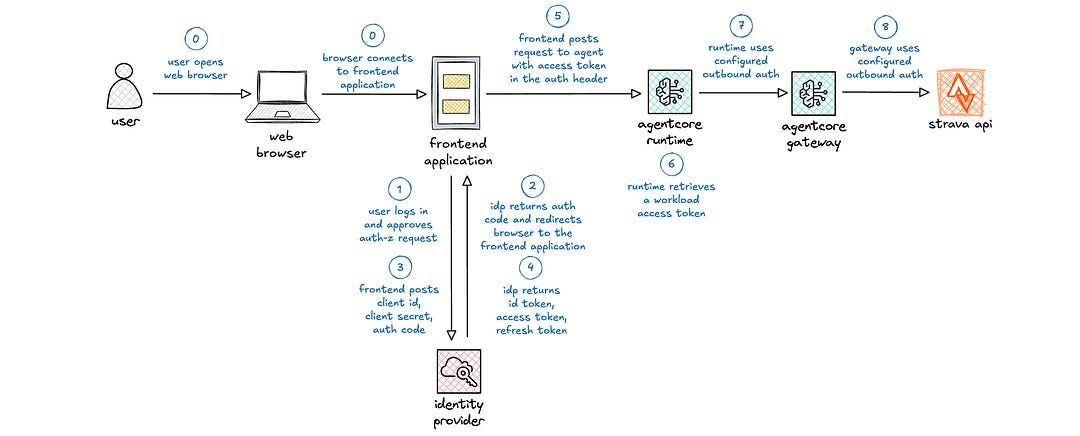
(0) The user opens a web browser and securely connects to the frontend web application, e.g., Streamlit or React application.
(1) The user is redirected to a login page. After successfully logging in, the user is redirected to an authorization page for approval.
(2) The identity provider redirects the user back to the frontend application with an authorization code.
(3) The frontend application posts the client id, client secret, and authorization code to the identity provider.
(4) The identity provider returns an id token, access token, and refresh token to the frontend application.
(5) When the user interacts with the frontend application that necessitates interaction with the agent, the frontend application posts a request to the agent with the access token in the authorization header.
This is the core of OAuth2 with browser-based web applications. Let’s get into where different elements should be used in this part of the earlier part of the request flow. After that, I resume covering integration with the agent and downstream tool calls.
Managing OAuth2 tokens in agentic deployments
Let’s start with client id and client secret, which are generated with the identity provider when a new application is registered.
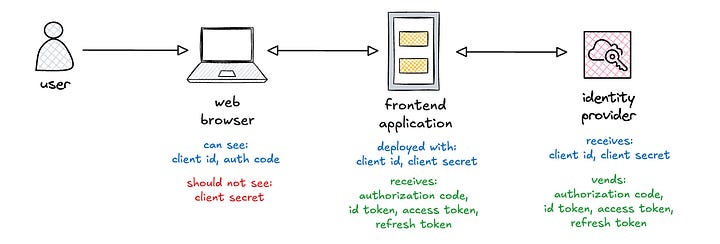
The client id is a permanent public string that identifies the application. It is deployed with the frontend application, often injected via environment variable. It is also visible as part of the query string parameter in requests to the identity provider.
The client secret is a permanent private string, akin to a password, that is used to authenticate applications with identity providers. It is also deployed with the frontend application, often via environment variable, and should never be exposed to any clients. It should be periodically rotated, which requires redeployment of the frontend application.
The authorization code is a temporary, short-lived, single use string that is used to retrieve tokens. It is visible as part of the query string parameter in the redirect URL from the identity provider. However, the authorization code must be combined with the client id and client secret to complete the token exchange. This is why it is critical to protect the client secret from public exposure.
I covered the tokens in my prior blog post, but I include them here again for completeness.
The id token is a short-lived token that is used to demonstrate that a user is authenticated and contains identity information about the user. If exposed, attackers can learn information about the user but cannot access protected resources nor get new tokens.
The access token is a short-lived token that is used by the resource server to validate a user’s level of access or authorization. It includes scopes, which enumerate the specific actions that are authorized by this token. If exposed, attackers can access protected resources for the duration of the token.
The refresh token is a long-lived token that is used to renew access tokens without having to re-authenticate. If exposed, attackers can get new tokens until this token eventually expires. This allows attackers to continue accessing protected resources for longer periods of time if they also have the access token.
Ok, so this covers where the various credentials and tokens are deployed and are visible. Let’s continue the request flow through AgentCore Runtime and to backend providers.
Applying tokens through the request flow
I put together a high-level view of the token exchanges when using AgentCore Identity. The blue activity is associated with the request flow for user 1. The orange activity is associated with the request flow for user 2. The green activity involves token exchanges with AgentCore Identity. I cover these in detail in the following sections.
In this diagram, note that I switched to using AgentCore Runtime for the MCP server, as AgentCore Runtime supports authorization code flow with downstream APIs.
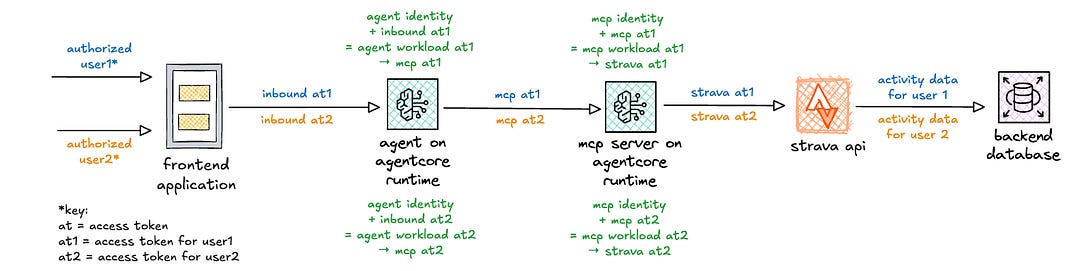
The key “equation” that AgentCore Identity handles is depicted in green: workload identity + inbound access token = workload access token, which is then used to get the outbound access token.
Starting with workload identities
When an agent or MCP server is deployed on AgentCore Runtime, a workload identity is automatically created. If deploying an agent elsewhere, your pipeline can create that workload identity when deploying the agent.
response = client.create_workload_identity(
  name=’fitness-agent’,
  allowedResourceOauth2ReturnUrls=[’url1’, ‘url2’],
  tags={
    ‘application:group’: ‘fitness’,
    ‘application:owner’: ‘heeki’
  }
)
Irrespective of where your agent is running, when the workload identity is created, that identity is stored in an agent identity directory.

The workload identity is the first part of the equation.
Retrieving workload access tokens
When configuring an agent on AgentCore Runtime, you can configure the authorizer to use OAuth2, pointing to the discovery URL of your identity provider. The incoming access token is validated with the configured identity provider. On successful validation, the access token is passed into the agent runtime.
This inbound access token is the second part of the equation.

If deploying to AgentCore Runtime, the retrieval of the workload access token is handled automatically. If deploying to an alternate compute environment, this can be done via code by your agent. There are two patterns for retrieving a workload access token, depending on how the end user is identified.
(6a) If the inbound authorization includes an access token (as depicted in figure 3 above), the workload identity and inbound access token are both used to retrieve the workload access token.
identity_client = IdentityClient(region=”us-east-1”)
workload_access_token = identity_client.get_workload_access_token(
  workload_name=”fitness-agent”,
  user_token=”base64-encoded-jwt”
)
(6b) If the inbound authorization does not have an access token, the workload identity and a unique string are used to retrieve the workload access token.
identity_client = IdentityClient(region=”us-east-1”)
workload_access_token = identity_client.get_workload_access_token(
  workload_name=”fitness-agent”,
  user_id=”user-identifier”
)
When would that latter situation apply? Where does that user identifier string come from? Great question!
Passing in user identities at runtime
When using IAM for inbound authorization, the agent does not receive an inbound access token. You can specify the user identifier by including the x-amazon-bedrock-agentcore-runtime-user-id header in your request. This allows you to inject a user identity, which is then used to retrieve OAuth2 tokens on behalf of that user, using the authorization code flow.
user_identifier = context.request_headers.get(”x-amazon-bedrock-agentcore-runtime-user-id”)
identity_client = IdentityClient(region=”us-east-1”)
workload_access_token = identity_client.get_workload_access_token(
  workload_name=”fitness-agent”,
  user_id=user_identifier
)
However, per documentation, only trusted principals with bedrock-agentcore:InvokeAgentRuntimeForUser permissions should be allowed to set this header and should ideally be derived from the authenticated principal’s context by the frontend application. In other words, do not allow users to inject arbitrary strings into the request header, as this would introduce a vulnerability to your application.
Ok, so we have the workload access token, but how does that then get exchanged for the outbound access token?
Retrieving outbound access tokens
When the agent needs to make outbound calls, it uses the workload access token to retrieve the outbound access token.
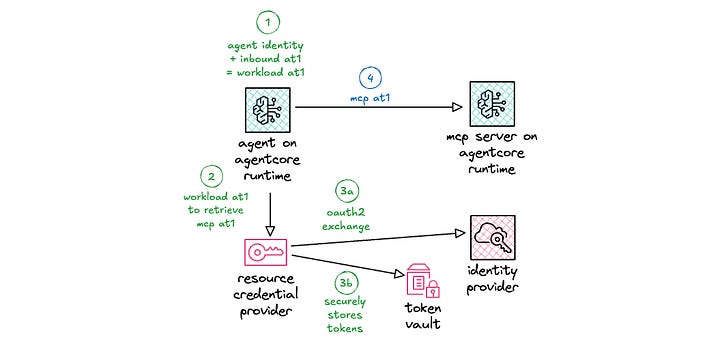
The resource credential provider is configured on deployment and can point to either an OAuth2 credential provider or an API key provider. So far, I’ve been focused on the OAuth2 credential provider. Later in this blog post, I cover the API key provider and how it can be used.
The resource credential provider uses the configured client id and client secret to retrieve the tokens. If this is the client credentials flow, the token exchange proceeds. If this is the authorization code flow, the authorization URL needs to be sent back to the end user for authorization to complete the token exchange.
When passing the authorization URL back to the end user, your application needs to ensure that the user who initiated the authorization request is the one who is now granting the request. Otherwise, an alternate user can gain access to the original user’s resources. This is handled with authorization URL session binding.
Upon successful retrieval of the tokens, AgentCore Identity uses a secure token vault for storing credentials, tokens, and API keys. That token vault can be encrypted using either AWS owned KMS keys or customer managed keys (CMK), where your organization owns the administration of key policies, rotation, and scheduled deletion.
To retrieve tokens from the secure token vault, a workload access token is required. Remember that the workload access token is retrieved using both the workload identity and the end user identity. This then ensures that tokens for user 1 (blue) are not exposed to user 2 (orange), as depicted in figure 3.
Now the agent can make an outbound request with a proper access token. The agent can now make a request to an MCP server, also hosted in AgentCore Runtime, with the outbound access token included in the authorization header. The same exchange process would then occur for that MCP tool to retrieve tokens to access the downstream Strava API.
Considering secrets injection patterns
Ok, so far I covered OAuth2 credentials and tokens, but what about other secrets, e.g., database credentials, API keys, etc.? I generally see three approaches to secrets injection.
(1) Injecting secrets at deploy time
(2) Injecting secrets at runtime via mount point
(3) Retrieving secrets at runtime via direct API call
Let’s think through each of these, and consider the pros/cons of each.
Injecting secrets at deploy time
Infrastructure as code templates can take input parameters that then inject a secret as an environment variable in the target compute deployment.
Parameters:
  injectedSecret:
    Type: String
Resources:
  Runtime:
    Type: AWS::BedrockAgentCore::Runtime
    Properties:
      EnvironmentVariables:
        INJECTED_SECRET: !Ref injectedSecret
The key caveat here is that the injected secret needs to be treated like a secret and not as a plaintext string. At the time of this writing, AgentCore Runtime treats environment variables as plaintext strings, so additional work needs to be done to encrypt the secret prior to injection and to decrypt the secret upon retrieval from the environment variable.
The upside of this approach is that does not require significant work on the part of the developer. The developer just needs to write code to read from (and decrypt) the appropriate environment variable. The downside of this approach is that each time the secret is rotated, a deployment is required for the application to see the updated secret.
Injecting secrets at runtime via mount point
An operator can fetch secrets from an upstream secrets store, write them to a volume, and then mount them to the compute environment where your agent is running. The application can then read those secrets at runtime.
The upside of this approach is that the operator handles management and rotation of the secrets. The developer just needs to write code to read from the volume. The downside of this approach is that it requires an environment that supports this methodology, e.g., k8s.
Of course, for those that are already running k8s, this isn’t really a downside. It’s just the normal course of action. That and yes, the operator can also inject secrets via environment variable.
For those that are interested in or running on AgentCore Runtime, this approach is not available, as volume mounts are not currently supported.
Retrieving secrets at runtime via direct API call
The application can fetch secrets directly from the secrets store, e.g., Hashicorp Vault, AWS Secrets Manager, or perhaps AgentCore Identity.
The upside of this approach is that the developer has full control over secrets retrieval, writing code to interact directly with the secrets endpoint. The downside of this approach is that the developer now has to write more code for handling token refreshes and errors, e.g., permissions issues, endpoint throttling, etc. With great power comes great responsibility.
Depending on the scale of your application, endpoint throttling is a key consideration. Ensure that your secrets store can handle possible thundering herd scenarios. If this is a possible concern, implement a caching strategy to mitigate that potential scenario. Be careful to weigh the trade-offs, as this introduces additional complexity.
Let’s take a look at how I might be able to do secrets injection via direct API call using AgentCore Identity.
Implementing secrets injection using API keys
The resource credential provider can be setup to store an API key (or a secret). You can configure it via code with the following:
response = client.create_api_key_credential_provider(
  name=”your-credential-provider”,
  apiKey=”your-secret”,
  tags={
    ‘application:group’: ‘fitness’,
    ‘application:owner’: ‘heeki’
  }
)
You can retrieve the API key (or the secret) via code with the following:
response = client.get_resource_api_key(
  resourceCredentialProviderName=’your-credential-provider’,
  workloadIdentityToken=’your-workload-access-token’
)
Alternatively, you can do this more simply using an annotation. You can configure your agent to retrieve the API key from the token vault via annotation.
from bedrock_agentcore.identity.auth import requires_api_key

@requires_api_key(provider_name=”your-credential-provider”)
async def fn_that_needs_api_key(api_key=”your-api-key-name”))
Either way, this allows you to store your secrets via AgentCore Identity via the API key credential provider. That said, be aware that AgentCore Identity does have a quota on the number of API key credential providers: 50.
If I need to manage more than 50 API keys or secrets, perhaps I can do something to increase the number of secrets that I can manage. Given the fact that the API key is just a string, I might consider creating a JSON object at the application level for storing multiple secrets that the agent would otherwise need anyway. This doesn’t expose more secrets than necessary, as the agent would have access those secrets already.
{
  ‘database-username’: ‘username’,
  ‘database-password’: ‘password’,
  ‘strava-api-key’: ‘your-api-key’,
  ‘arbitrary-token’: ‘abcde12345’
}
This does, however, add (slightly) more overhead to injecting and extracting secrets, as the operator and developer need to work with a JSON object rather than just the secret string itself. This, of course, is a workaround for the current quota. If you don’t need more secrets than the current quota in your account, then stick with just injecting the secret.
And thinking out loud, I’d love it if AgentCore Identity could directly source secrets from other secrets stores. For example, setup a configuration to sync a subset of secrets directly from Vault or Secrets Manager. Non-trival, I’m sure, but that would be a great integration for organizations with existing secrets stores.
Conclusion
In this post, I refreshed on how OAuth2 flows apply to agents, showed where tokens should be deployed, and discussed broader secrets management patterns.
These flows are important to ensure that only authorized actions are allowed throughout the request chain. This ensures that each step of the chain uses a separate set of tokens, avoiding the confused deputy problem. It’s also critical to ensure that credentials or tokens are not inappropriately exposed that could lead to unintended security vulnerabilities in your agentic applications.
I hope this deep dive was helpful as you think through how to secure your agentic applications! Up next, I plan to spend some time writing about multi-agent collaboration. Stay tuned!
Resources
Note
This article was originally published on Medium.